---
title: Completing the Risk Assessment
description: Completing the Risk Assessment Form
---
[Skip to content](https://crm.streamworkstech.com/sqmknowledge/completing-the-risk-assessment#main-content)
English
Show submenu for translations

Open main navigation
Close main navigation
- English
Show submenu for translations
- [Contact us](https://share.hsforms.com/1PJtrC1B7Squ0Pompg3m5iAeaa0v)
[Contact us](https://share.hsforms.com/1PJtrC1B7Squ0Pompg3m5iAeaa0v)
How can we help you?
- There are no suggestions because the search field is empty.
1. [SQM Guide](https://crm.streamworkstech.com/sqmknowledge?hsLang=en)
2. [User Guide](https://crm.streamworkstech.com/sqmknowledge/user-guide?hsLang=en)
3. [Form Functionality](https://crm.streamworkstech.com/sqmknowledge/user-guide?hsLang=en#form-functionality)
# Completing the Risk Assessment
### Key Functions
- Understanding the Form
- The Guides
### Understanding the Form
The form is titled 'Set quality objectives, identify and assess risks, develop quality policies and procedures' that you need to complete.
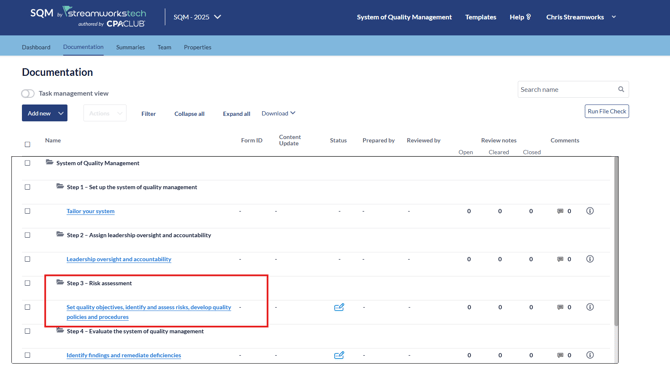
It is broken up into two main sections, 'Identifying the Objectives for the Components' and then 'Assessing risks, adding responses and adding Monitoring Activities'.
When in the form, make sure to click 'Edit' to begin editing information.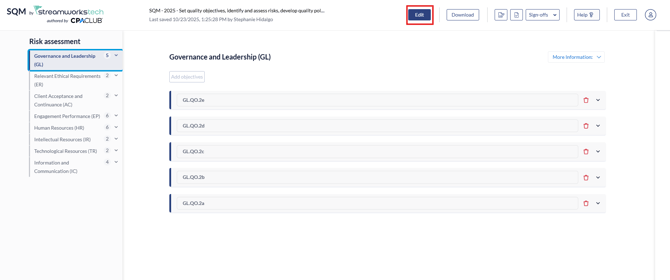
The following guide set will show you how to complete the form, if you need additional content help, you can reach out to CPAClub. CPAClub is available for Quality Management advisory with affordable subscriptions to meet your needs, for more details, visit: [Accounting Solutions for Companies | CPAClub](https://cpaclub.cpa/#solutions)
On how to edit and use the form, see the following breakdown of guides.
### The Guides
1. [Assessing Objectives and Components](https://crm.streamworkstech.com/sqmknowledge/adding-and-editing-objectives?hsLang=en)
2. [Assessing Risks](https://crm.streamworkstech.com/sqmknowledge/assessing-risks?hsLang=en)
3. [Adding Responses](https://crm.streamworkstech.com/sqmknowledge/assessing-responses?hsLang=en)
4. [Adding Monitoring Activities](https://crm.streamworkstech.com/sqmknowledge/assessing-monitoring-activities?hsLang=en)
- [User Guide](https://crm.streamworkstech.com/sqmknowledge/user-guide?hsLang=en#main-content)
- [Getting Started](https://crm.streamworkstech.com/sqmknowledge/user-guide?hsLang=en#getting-started)
- [Form Functionality](https://crm.streamworkstech.com/sqmknowledge/user-guide?hsLang=en#form-functionality)
- [Application Functionality](https://crm.streamworkstech.com/sqmknowledge/user-guide?hsLang=en#application-functionality)
- [Common Tools](https://crm.streamworkstech.com/sqmknowledge/user-guide?hsLang=en#common-tools)
- [Support and Account Help](https://crm.streamworkstech.com/sqmknowledge/user-guide?hsLang=en#support-and-account-help)
[](https://streamworkstech.com/)
[mailto:email@email.com](mailto:email@email.com)
Copyright © 2026, Streamworks Tech Inc.