---
title: Assessing Risks
description: Assessing Risks
---
[Skip to content](https://crm.streamworkstech.com/sqmknowledge/assessing-risks#main-content)
English
Show submenu for translations

Open main navigation
Close main navigation
- English
Show submenu for translations
- [Contact us](https://share.hsforms.com/1PJtrC1B7Squ0Pompg3m5iAeaa0v)
[Contact us](https://share.hsforms.com/1PJtrC1B7Squ0Pompg3m5iAeaa0v)
How can we help you?
- There are no suggestions because the search field is empty.
1. [SQM Guide](https://crm.streamworkstech.com/sqmknowledge?hsLang=en)
2. [User Guide](https://crm.streamworkstech.com/sqmknowledge/user-guide?hsLang=en)
3. [Form Functionality](https://crm.streamworkstech.com/sqmknowledge/user-guide?hsLang=en#form-functionality)
# Assessing Risks
### Key Functions
- Assessing Risks
### Assessing Risks
1. Each Objective will have it's own set of Risks associated with it. To access those risks select the Objective nested underneath a Component.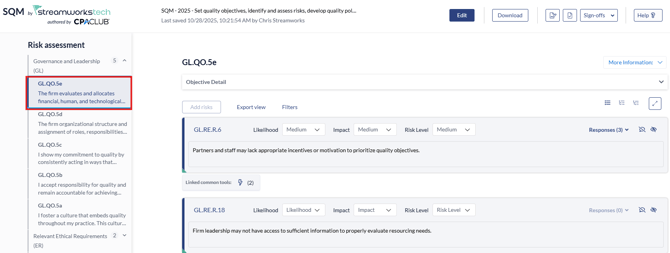
2. Risks will be prepopulated depending on the Tailor you System form filled in, [see this guide here on how to do that.](https://crm.streamworkstech.com/sqmknowledge/tailor-your-system?hsLang=en)
3. Each risk is outlined underneath the Component code.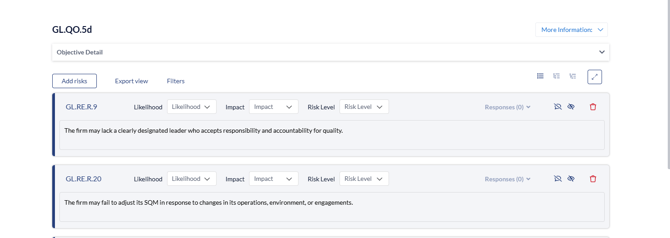
4. You can click the 'Objective Detail' dropdown to see the definition of the Objective.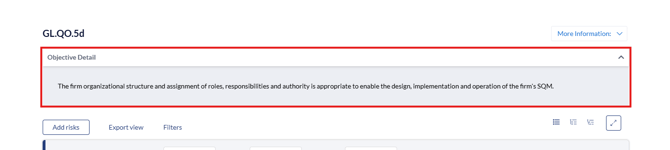
5. To add any new risks, you can click the 'Add Risk' button.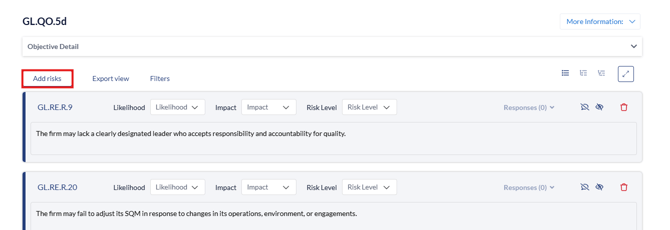
6. When 'Add Risk' is clicked, you can add any risk from the library by selecting the risk with the checkbox and clicking 'Save'. Or you can add a 'Custom Risk' which adds a blank risk.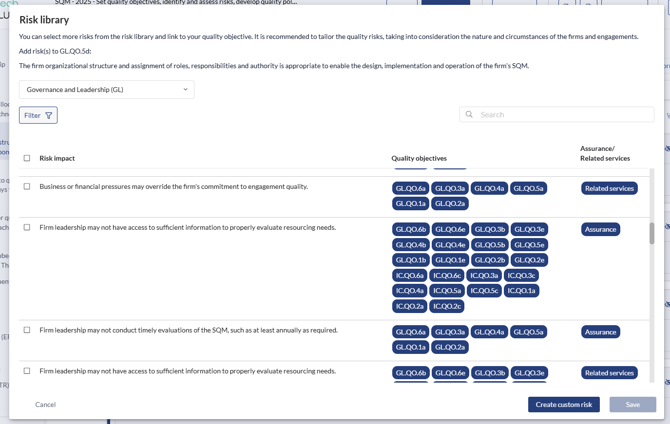
7. You can edit any risk terminology by clicking in the textbox to enable editing.
8. To add a risk, the 'Liklihood', 'Impact' and 'Risk Level' need to have a severity level selected.
9. Once selected the 'Responses' button will become available.
To Assess Responses, [go to this guide next.](https://crm.streamworkstech.com/sqmknowledge/assessing-responses?hsLang=en)
- [User Guide](https://crm.streamworkstech.com/sqmknowledge/user-guide?hsLang=en#main-content)
- [Getting Started](https://crm.streamworkstech.com/sqmknowledge/user-guide?hsLang=en#getting-started)
- [Form Functionality](https://crm.streamworkstech.com/sqmknowledge/user-guide?hsLang=en#form-functionality)
- [Application Functionality](https://crm.streamworkstech.com/sqmknowledge/user-guide?hsLang=en#application-functionality)
- [Common Tools](https://crm.streamworkstech.com/sqmknowledge/user-guide?hsLang=en#common-tools)
- [Support and Account Help](https://crm.streamworkstech.com/sqmknowledge/user-guide?hsLang=en#support-and-account-help)
[](https://streamworkstech.com/)
[mailto:email@email.com](mailto:email@email.com)
Copyright © 2026, Streamworks Tech Inc.