---
title: Assessing Monitoring Activities
description: Add Monitoring Activities
---
[Skip to content](https://crm.streamworkstech.com/sqmknowledge/assessing-monitoring-activities#main-content)
English
Show submenu for translations

Open main navigation
Close main navigation
- English
Show submenu for translations
- [Contact us](https://share.hsforms.com/1PJtrC1B7Squ0Pompg3m5iAeaa0v)
[Contact us](https://share.hsforms.com/1PJtrC1B7Squ0Pompg3m5iAeaa0v)
How can we help you?
- There are no suggestions because the search field is empty.
1. [SQM Guide](https://crm.streamworkstech.com/sqmknowledge?hsLang=en)
2. [User Guide](https://crm.streamworkstech.com/sqmknowledge/user-guide?hsLang=en)
3. [Form Functionality](https://crm.streamworkstech.com/sqmknowledge/user-guide?hsLang=en#form-functionality)
# Assessing Monitoring Activities
### Key Functions
- Assessing Monitoring Activities
### Assessing Monitoring Activities
1. Click the 'Monitoring Activities' dropdown from the Response.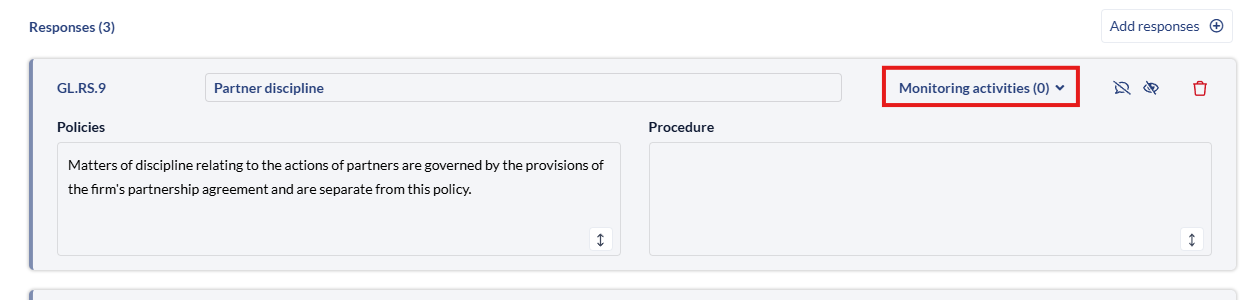
2. The 'Add Monitoring' activities button will appear, click that to add your Monitoring Activities to the response.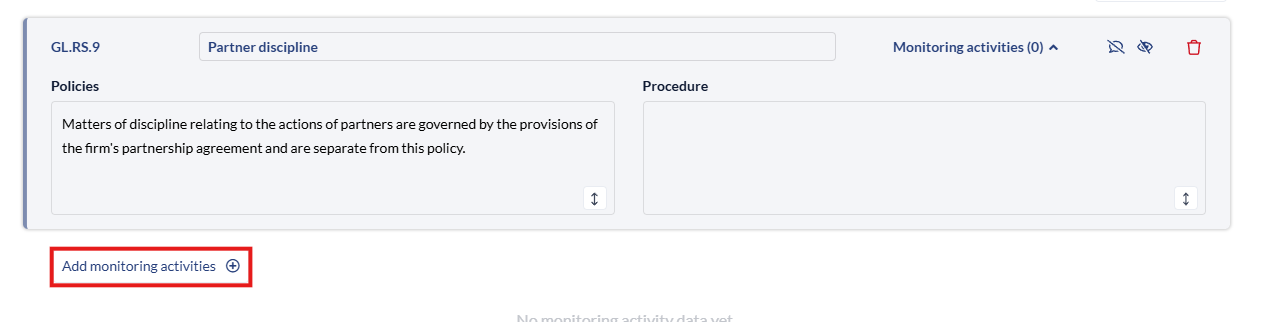
3. Click the checkbox and click save to add any Monitoring Activities you want to add, you can also click 'Create Custom Monitoring Activity' to add a blank version.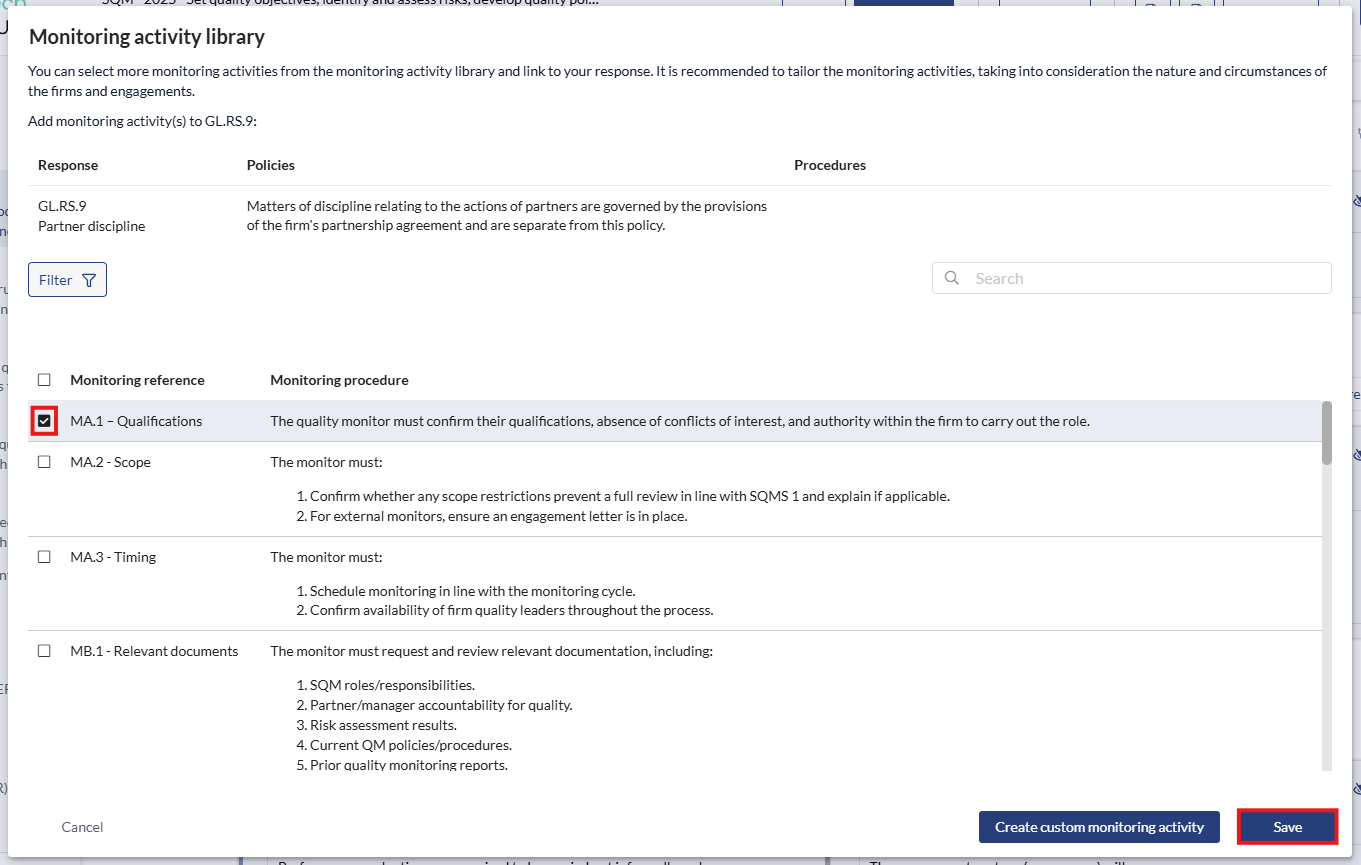
4. The information will appear below the 'Monitoring Activity' for further editing. Here you can update the definition, add scheduling and records.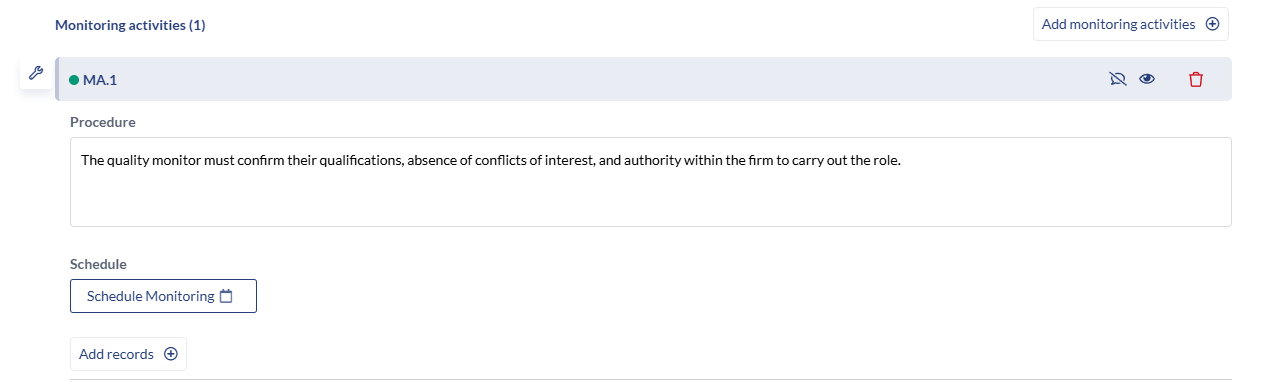
- [User Guide](https://crm.streamworkstech.com/sqmknowledge/user-guide?hsLang=en#main-content)
- [Getting Started](https://crm.streamworkstech.com/sqmknowledge/user-guide?hsLang=en#getting-started)
- [Form Functionality](https://crm.streamworkstech.com/sqmknowledge/user-guide?hsLang=en#form-functionality)
- [Application Functionality](https://crm.streamworkstech.com/sqmknowledge/user-guide?hsLang=en#application-functionality)
- [Common Tools](https://crm.streamworkstech.com/sqmknowledge/user-guide?hsLang=en#common-tools)
- [Support and Account Help](https://crm.streamworkstech.com/sqmknowledge/user-guide?hsLang=en#support-and-account-help)
[](https://streamworkstech.com/)
[mailto:email@email.com](mailto:email@email.com)
Copyright © 2026, Streamworks Tech Inc.