---
title: Access Billing Portal
description: Accessing Billing Portal, Updating Credit Card, Downloading Invoice, Purchasing Seats
---
[Skip to content](https://crm.streamworkstech.com/sqmknowledge/access-billing-portal#main-content)
English
Show submenu for translations

Open main navigation
Close main navigation
- English
Show submenu for translations
- [Contact us](https://share.hsforms.com/1PJtrC1B7Squ0Pompg3m5iAeaa0v)
[Contact us](https://share.hsforms.com/1PJtrC1B7Squ0Pompg3m5iAeaa0v)
How can we help you?
- There are no suggestions because the search field is empty.
1. [SQM Guide](https://crm.streamworkstech.com/sqmknowledge?hsLang=en)
2. [User Guide](https://crm.streamworkstech.com/sqmknowledge/user-guide?hsLang=en)
3. [Support and Account Help](https://crm.streamworkstech.com/sqmknowledge/user-guide?hsLang=en#support-and-account-help)
# Access Billing Portal
## Updating Credit Cards, Accessing Invoices and Purchasing New Seats can be accessed from the Billing Portal
### Key Functions
- Accessing the Billing Portal from the Menu
- Accessing the Billing Portal from the User Page
### Accessing the Billing Portal from the Menu
1. Click the dropdown menu in the top right hand corner with your name.
2. Select 'Billing Portal' from the dropdown menu.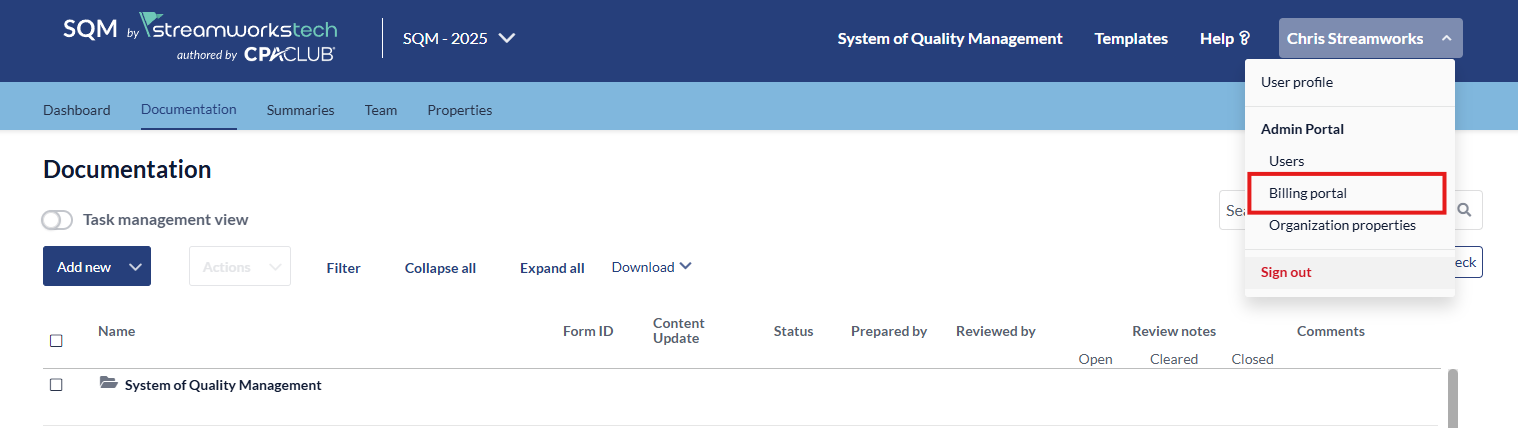
### Accessing the Billing Portal from the User Page
1. From the 'Users Portal' click 'Billing Portal' from the main page.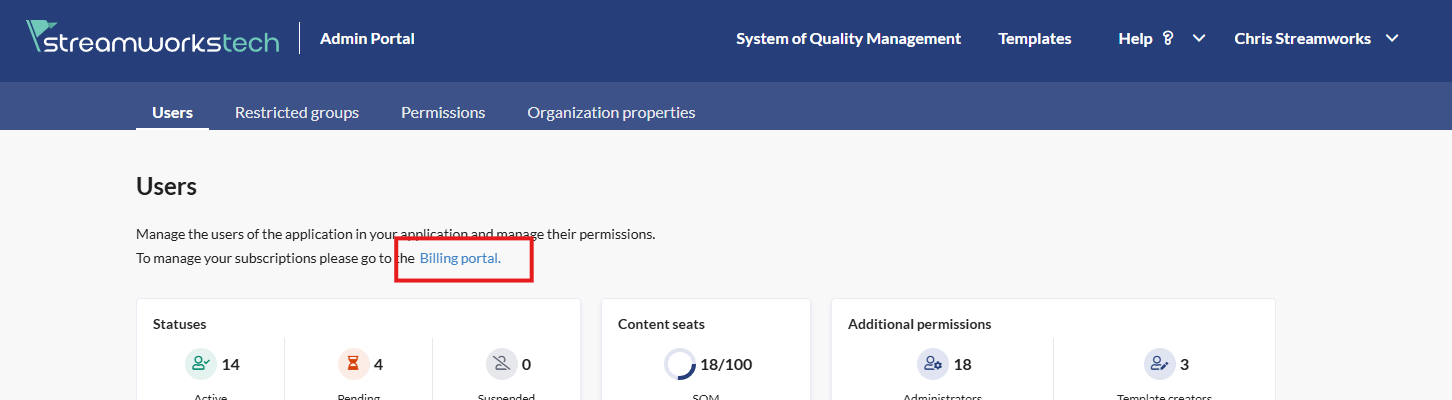
- [User Guide](https://crm.streamworkstech.com/sqmknowledge/user-guide?hsLang=en#main-content)
- [Getting Started](https://crm.streamworkstech.com/sqmknowledge/user-guide?hsLang=en#getting-started)
- [Form Functionality](https://crm.streamworkstech.com/sqmknowledge/user-guide?hsLang=en#form-functionality)
- [Application Functionality](https://crm.streamworkstech.com/sqmknowledge/user-guide?hsLang=en#application-functionality)
- [Common Tools](https://crm.streamworkstech.com/sqmknowledge/user-guide?hsLang=en#common-tools)
- [Support and Account Help](https://crm.streamworkstech.com/sqmknowledge/user-guide?hsLang=en#support-and-account-help)
[](https://streamworkstech.com/)
[mailto:email@email.com](mailto:email@email.com)
Copyright © 2026, Streamworks Tech Inc.