
Overview
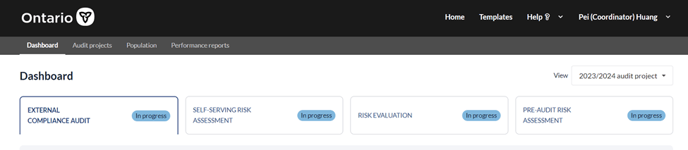
The top navigational menu bar will be pervasive across the platform. Located at the top of the application window, the top navigation menu bar contains tabs which are contextual to a particular view.
Key functions
The top navigation menu bar is comprised of the following tabs:
For MTO audit team
For 3rd-party vendor

User flow
|
Dashboard |
This view is accessible by both MTO team and 3rd-party vendor. For 3rd-party vendor: This view provides the summary status and important dates of the audit cases assigned to the specific vendor user. For MTO team: This view provides the summary status and important dates of all the audit cases for that audit cycle. In addition, The MTO team can access archived audit cases from previous audit cycles on this view. |
|
Audit projects |
This view is accessible by the MTO team only. This view provides a holistic picture of the overall audit project status, for current and past audit cycles. |
|
Population |
This view is accessible by the MTO team only. There are two sub-tabs under the Population tab. The ‘Authorized Requesters’ view allows the MTO team to review existing Authorized Requester population. User can also import new Authorized Requesters as well as incremental transaction volumes on this view. The ‘Applicants’ view allows the MTO team to review Applicants population. |
|
Performance reports |
This view is accessible by the MTO team only. This view provides the MTO team with reporting on the overall status of the Authorized Requester program. The MTO team can switch between current and past audit cycles. |