Key Functions
- Ability to select from comprehensive list of available templates.
- Ability to edit the template using the built in document editor
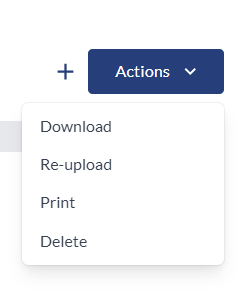
- Ability to Download, Reupload, Print, or Delete file.
User Flow
Ability to select from comprehensive list of available templates
- Once the user initiates an engagement within the platform, they are presented with the option to utilize either a non-digitalized template or a digitalized template to streamline their work process.
- When the user opts for a non-digitalized template, the system generates a comprehensive list of available templates for their selection:
- Engagement Letter - Financial projections
- Engagement letter — Bookkeeping services
- Engagement Letter - Financial forecast
- Management representation letter - Financial projections
- Management representation letter — Financial forecast
- Management representation letter — Compilation
- C3-90 Withdrawal
- C3-95 Report transmittal
- Time budget template
- Bookkeeping Client-Items to Request
- Bookkeeping Client-Preparation and Review
- Corporate tax engagement letter - 2021
- General tax consulting services engagement letter - 2022
- General tax compliance services engagement letter - 2021
- Partnership tax services engagement letter - 2021
- Personal tax services engagement letter - 2021
- Trust tax services engagement letter - 2021
- Standard transmittal letter — Federal T1 personal income tax return (EFILE) - 2023
- Standard transmittal letter — Federal T1 personal income tax return (PAPER FILE) - 2023
- Standard transmittal letter — Federal T2 corporate income tax return (EFILE)
- Capital Dividend Election Checklist - 2021
- Characteristics of a high-quality tax practice checklist (new) - 2022
- Client Acceptance Checklist - 2021
- Estate planning and trust basics checklist (new) - 2022
- Partnership Financial Return (T5013) Checklist - 2022
- Registered Charity Information Return (T3010) Checklist - 2021
- T1 — Personal tax checklist - 2022 taxation year (updated 2023)
- T1 — Personal tax organizer - 2022 taxation year (updated 2023)
- T2 — Corporate tax checklist - 2022 taxation year (updated 2023)
- T3 — Trust tax checklist - 2021
- Prepaid Schedule
- FA schedule
- Billing template
- Letter to a predecessor accounting firm
Once the user has selected their preferred template, they can proceed to add it directly to the engagement as described in the subsequent points. To make any edits to the template, the user must first download the template, make their desired changes, and reupload the modified template to the application.
- Within this scenario, the user can proceed to select their preferred template and subsequently add it directly to the engagement.
Ability to edit the template using the built in document editor
- The user can click on the filename to open up a document editor to make changes to a file and save it all without downloading anything to their computer.

Ability to Download, Reupload, Print, or Delete file.
- In addition, there will be an “Actions” dropdown present in the applicable section. When the user clicks that dropdown, there will be four options: "Download", "Reupload", "Print" or "Delete".
- The user can download the file in its original format, reupload a new file, print the current file, or delete it entirely.