
Key Functions
- Ability to Carry forward sections, attachments, workpapers, other files
- Trial balance - current period file in the previous engagement now becomes a previous period file in the new engagement.
- Financial report – content gets carried forward except signatures
- Document requests – content gets carried forward except integration and e-sign requests
User Flow
Ability to Carry forward sections, attachments, workpapers, other files
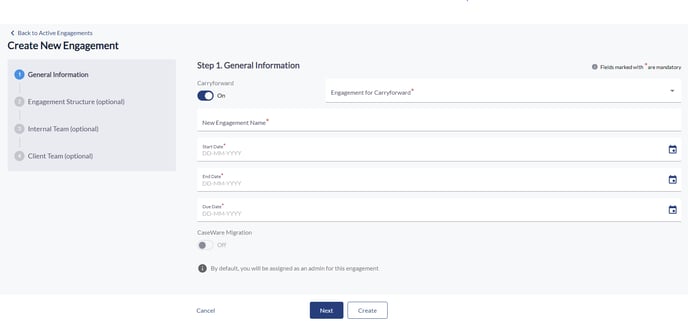
- You select the carryforward option to initiate the creation of a new engagement, thereby carrying forward elements from a previous engagement.
- Following this, the entire structure or hierarchy of the carried forward engagement, including all sections, attachments, and other files, appears on the right panel of the user interface.
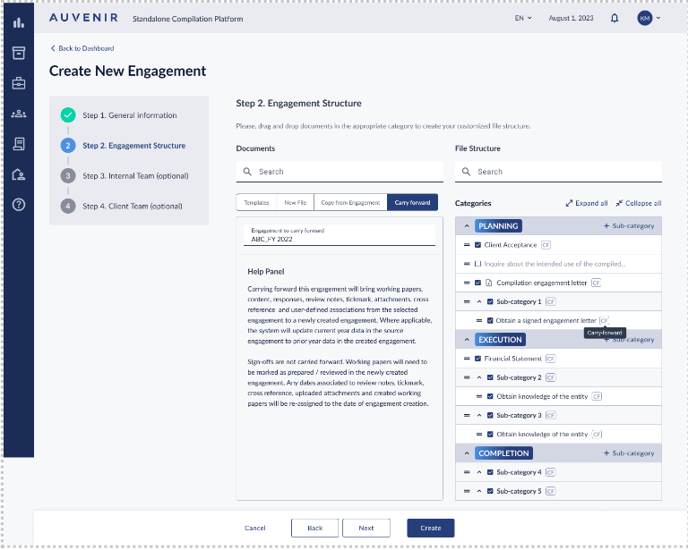
- You can see all working papers from the previous engagement brought over to the new engagement.
- Additionally, content including selected responses made on the working papers is carried forward.
- Be aware that signoffs or signatures from the previous engagement are not carried forward.
- You will notice that next to each item carried forward, there's a "CF" logo, indicating that the item was carried forward from the previous engagement.
- To the left, there's a help panel for the user, describing the functionality and how to select/deselect items for carryforward.
Trial balance - current period file in the previous engagement now becomes a previous period file in the new engagement.
- In the trial balance section, you will find the current period set to blank, indicating no file selection for the current period.
- For the previous period within the trial balance, all files except the oldest are retained, with the oldest file purged and removed.
- The file designated as the current period file in the previous engagement now becomes a previous period file in the new engagement.
Financial report – content gets carried forward except signatures
- In the financial report, all content is loaded, except signatures and workflow status, which the user should be aware of.
Document requests – content gets carried forward except integration and e-sign requests
- Document requests, except integration and e-sign requests will be carried forward. No client users will be assigned.